It picks up immediately
No queue, no “press 1”, no dependence on whoever happens to be nearest the phone.
How it works
There are four things a good receptionist does: knows the business, holds a conversation, does something useful, and writes it down. Wepickup is built around those four, and nothing on this page describes anything else.
Free plan, no card required. 20 AI-answered calls a month.
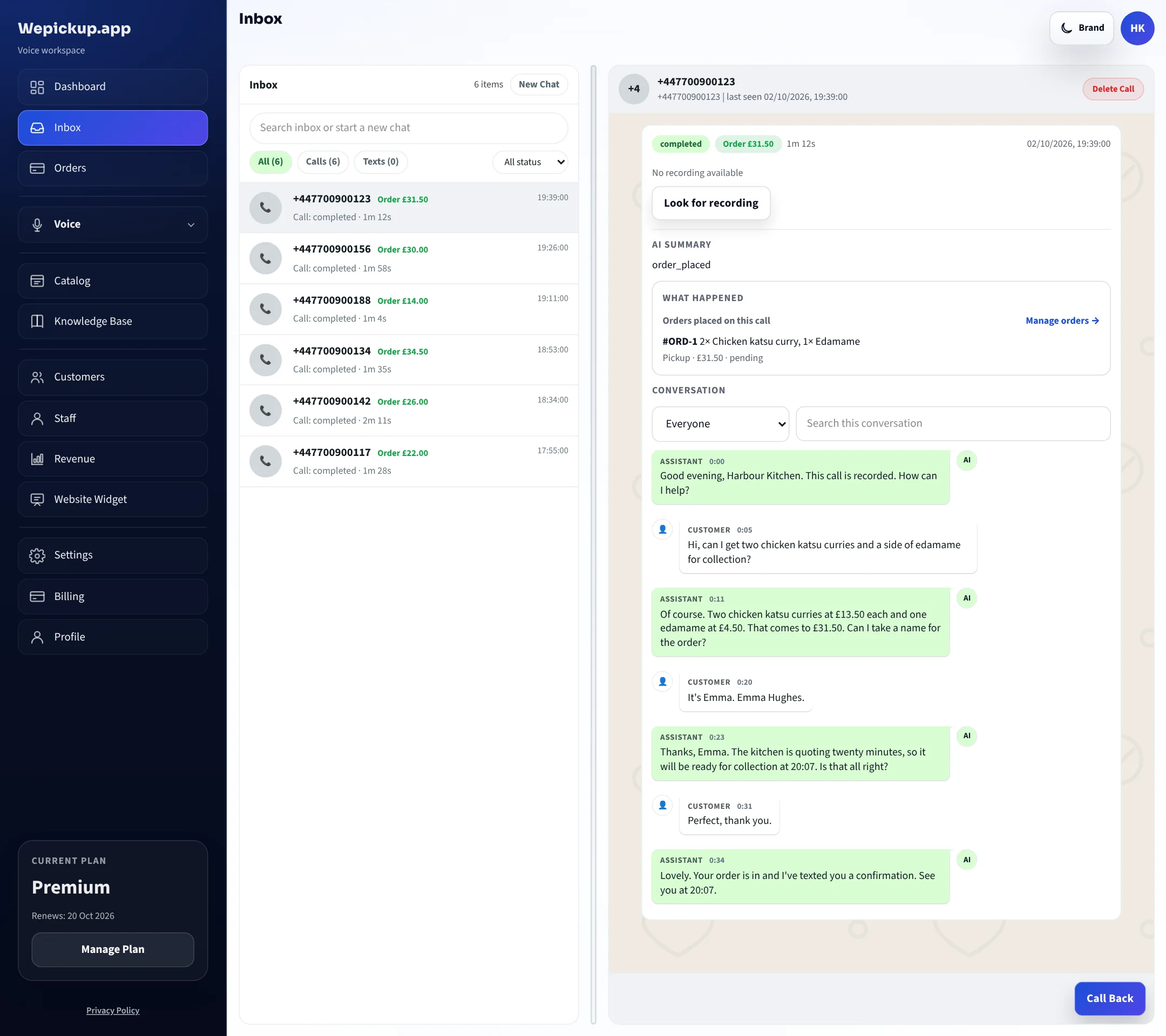
The whole thing in one call
Play either call below. The labels beside the transcript name the actual lookups the runtime performs — the same ones you can see afterwards in the call log.
Harbour Kitchen
19:42 on a Friday. Both staff on the pass. The phone rings for the fourth time in ten minutes.
Good evening, Harbour Kitchen. How can I help?
Hi — can I get two chicken katsu and a side of edamame for collection?
Two chicken katsu and one edamame. The katsu is £13.50 each and edamame is £4.50 — £31.50 in total.
lookup_menu_itemPrices read from the catalog, not generated
Perfect. How long?
Collection is about 25 minutes tonight. Can I take a name and number for the order?
search_knowledgeCollection timing from your saved business rules
It's Emma, 07700 900123.
Thanks Emma. That's booked in for 20:07 collection. I'll text you the summary now.
place_orderOrder written to the Orders screen
Sent. See you shortly.
send_text_to_callerOne combined confirmation per call
Illustrative call using the seeded demo business Harbour Kitchen. Tool names are the ones the live runtime calls.
One — it knows your business
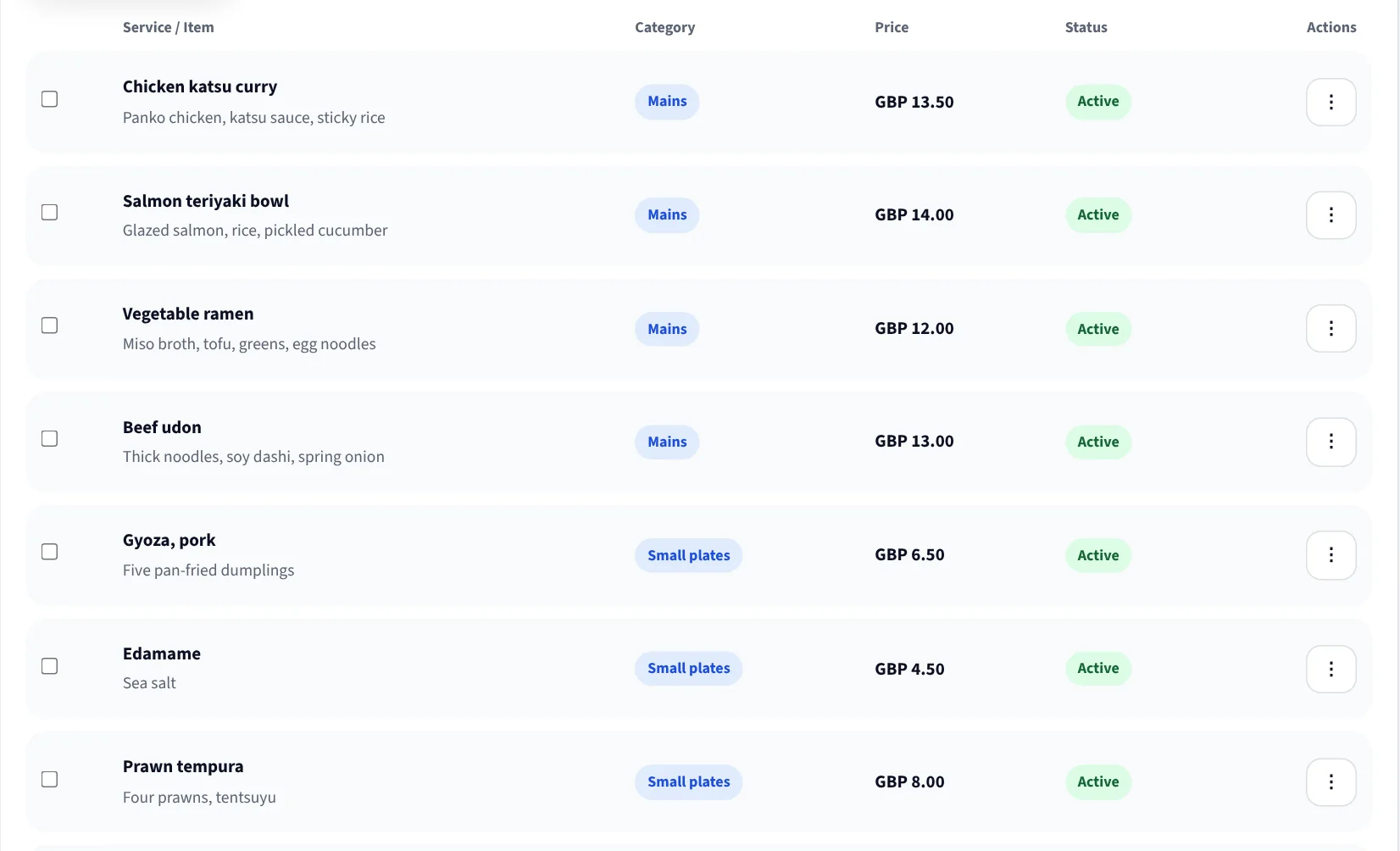
Menu items or treatments, their categories, prices, durations and availability live in one place. During a call the assistant reads them; it does not recall them.
That is what makes it safe to leave running during service: a price it quotes is a price in your catalog, and an item you have marked off is an item it will not offer.
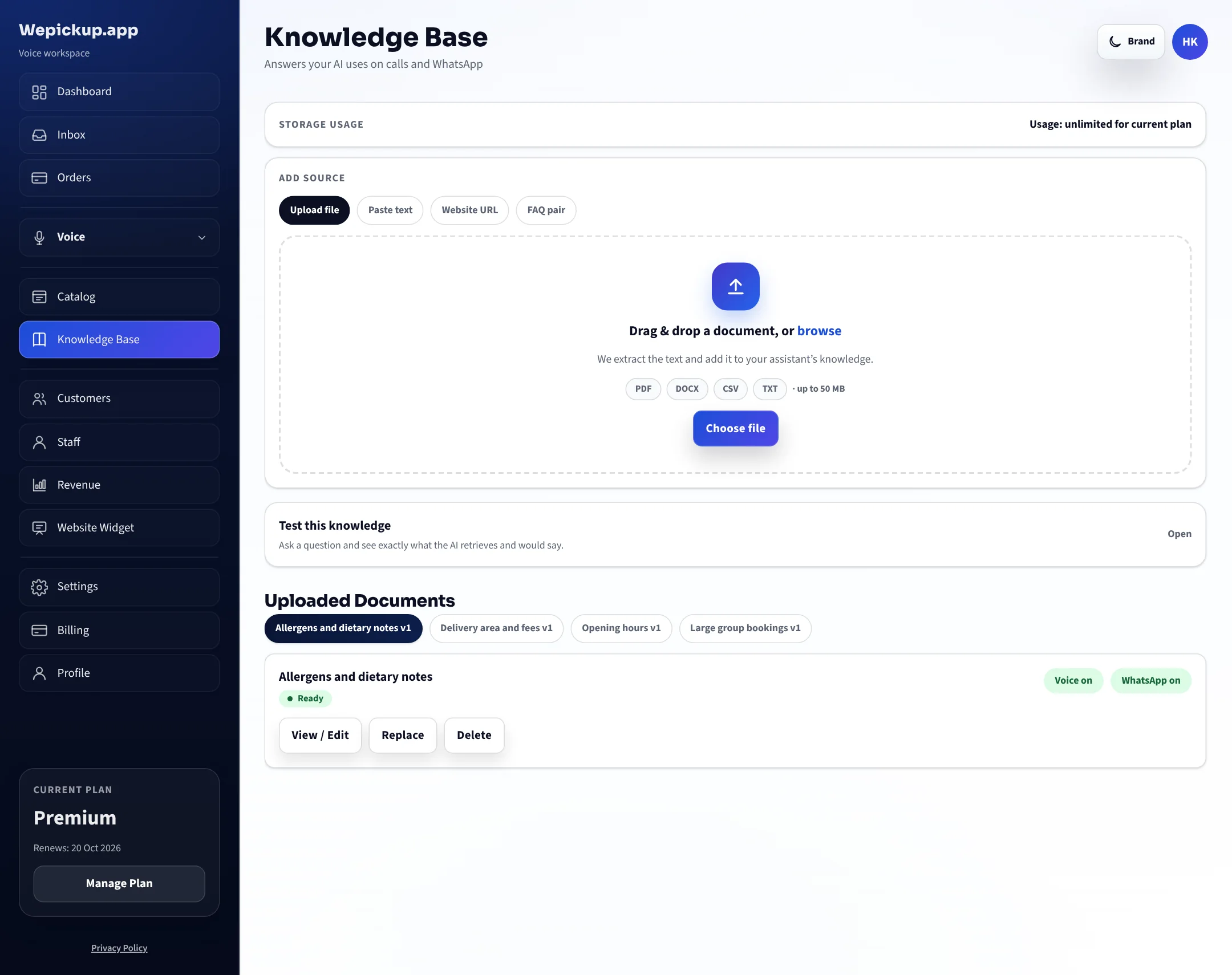
Opening hours, delivery range, cancellation terms, parking, arrival instructions — the things a new member of staff would be told in their first week. Write each one once.
When a caller asks something your rules do not cover, the assistant does not fill the gap. It says it does not have that information and offers a message or a transfer.
Two — it answers naturally
No queue, no “press 1”, no dependence on whoever happens to be nearest the phone.
Choose the language your line answers in when you set up your voice settings.
Out-of-hours callers get an honest answer about when you are open and still leave a usable record.
Three — it takes an action
Multi-item orders with options and quantities, priced from the catalog, written into the Orders screen with the caller’s details.
Availability checked live, the next free slot offered when the first choice is taken, and the booking held in your calendar.
Fees and range from your own rules, with a clear out-of-range answer rather than an order you cannot fulfil.
One combined text per call, so the customer has the same summary your team is working from.
You nominate a transfer number. When a caller asks for a person, or the conversation reaches the edge of what your rules allow, the call is transferred to that number and the handover is recorded like any other outcome.
An assistant that can hand over is more useful than one that tries to handle everything, and it is how you keep control of the calls that matter most.
Four — it records the result
Calls, transcripts, orders, bookings and customers accumulate in one workspace, with reporting over the top. If a customer queries what was agreed, you read it.
Every call, its length, its outcome and its transcript.
Working records your team acts on, linked back to the call that created them.
Numbers matched to history, so a regular is recognised on their next call.
Call volume, orders, bookings and revenue over time.
Not yet included
Handling WhatsApp enquiries alongside calls is built and deployed, and it is gated off in the dashboard while Meta’s validation completes.
Coming soon. WhatsApp is not part of what you buy today and is not counted in any plan description on this site. When validation completes we will say so here first. Everything else on this page is live now.
For technical teams
Inbound calls arrive on a Twilio number attached to your workspace and are handed to the voice runtime, which manages speech, turn-taking and the tool calls described above. Numbers are provisioned or verified from the dashboard.
Business answers are produced by explicit tool calls against your tenant’s data — catalog lookups, availability checks, knowledge-base search, delivery calculation, order and booking creation. Each call is recorded in a tool log you can inspect per conversation.
Assistant behaviour is configuration held per tenant, with saved versions and a rollback path, plus a scenario simulation endpoint used internally to check a configuration before it is applied to a live line.
Call outcomes can be pushed to your own endpoint with a signed webhook, and customer records can be exported as CSV. See integrations for what is available now versus supported through a webhook.
FAQ
Answers about what you sell come from your catalog, and answers about how you operate come from your knowledge base. Both are lookups, not recollection. Where neither has an answer, the assistant says it does not know and offers to take a message or transfer the call.
Yes. Every call is listed in the workspace with its duration, the outcome it produced and the full transcript. You can also see which lookups it performed during the call.
The dashboard refreshes as you use it, so you watch activity build up rather than receiving instant push updates. We would rather say that plainly than promise live streaming we do not deliver today.
English, Spanish, French, Thai, Mandarin and Cantonese are the configured voice languages. You choose the one your line answers in.
Connect a number, import your menu or service list, and hear how your line is answered from the next call onwards.
Free plan, no card required. 20 AI-answered calls a month.